GTA 5およびGTAオンラインで富への秘密のロックを解除する
このガイドでは、Grand Theft Auto 5(GTA 5)ストーリーモードとGTAオンラインで進捗状況を保存する方法について詳しく説明しています。どちらのゲームも、右下隅にある回転オレンジ色の円で示されているAutoSavesを備えていますが、手動の保存も可能です。
GTA 5ストーリーモードの保存:
GTA 5のストーリーモードで手動保存するための2つの主要な方法があります。
1。セーフハウスで寝る:
- セーフハウスを見つけます(地図上のホワイトハウスのアイコンでマークされています)。
- 主人公のベッドに近づきます。
- 「E」(キーボード)または右のDパッドボタン(コントローラー)を押して、セーブゲームメニューをトリガーします。
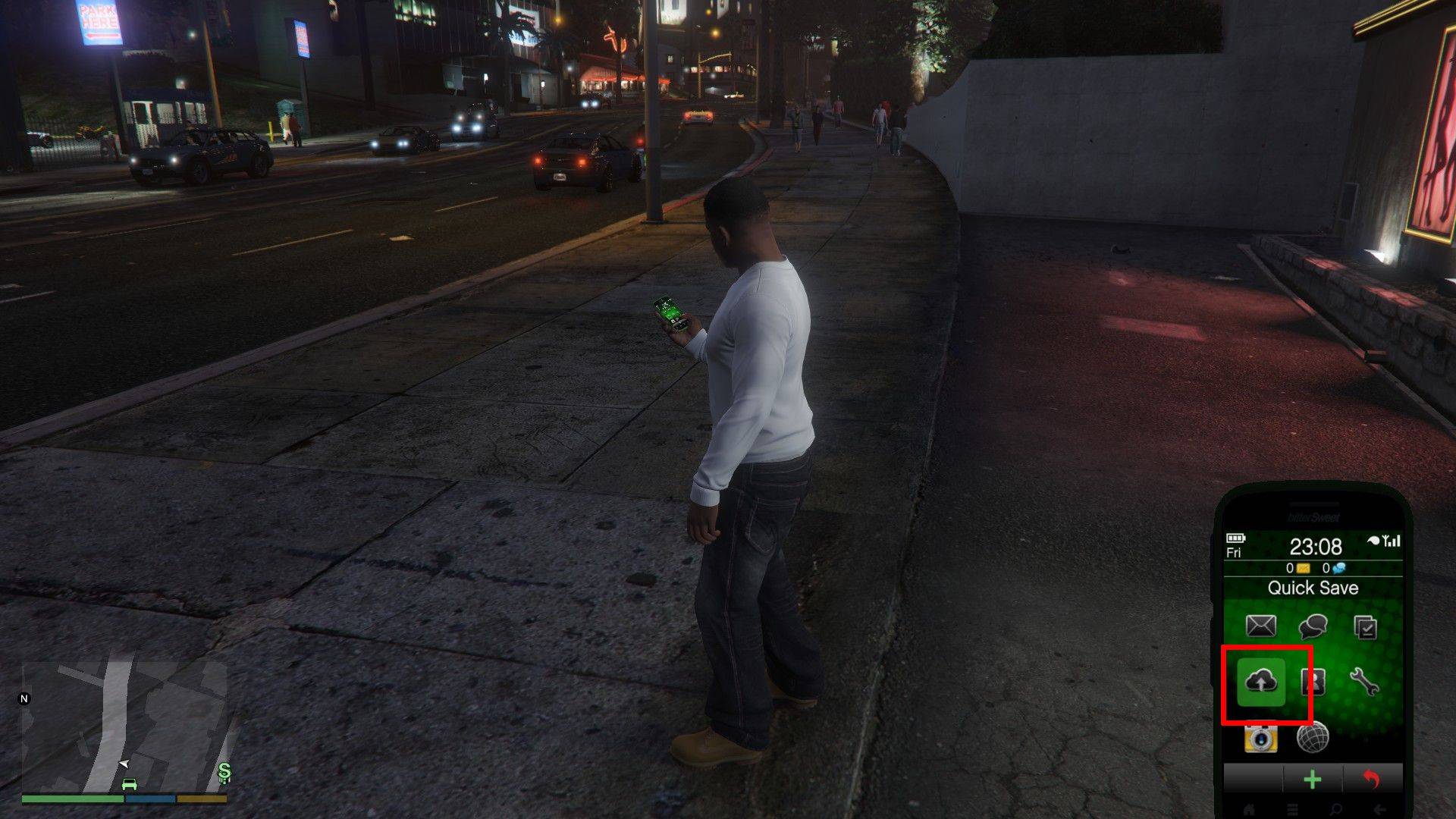
2。携帯電話の使用:
- 携帯電話を開きます(キーボードの矢印キーまたはコントローラーのD-PADで上に)。
- クラウドアイコンを選択して、保存ゲームメニューにアクセスします。
- 保存を確認します。
GTAオンライン節約:
GTA Onlineには、専用のマニュアル保存メニューがありません。ただし、これらの方法を使用してオートソーブを強制することができます。
1。服装/アクセサリーの変更:
- インタラクションメニュー(キーボードのMキーまたはコントローラーのタッチパッド)を開きます。
- 「外観」、「アクセサリー」を選択します。
- アクセサリを変更するか、衣装を完全に切り替えます。
- インタラクションメニューを終了します。オレンジオートセーブサークルに注意してください。必要に応じて繰り返します。
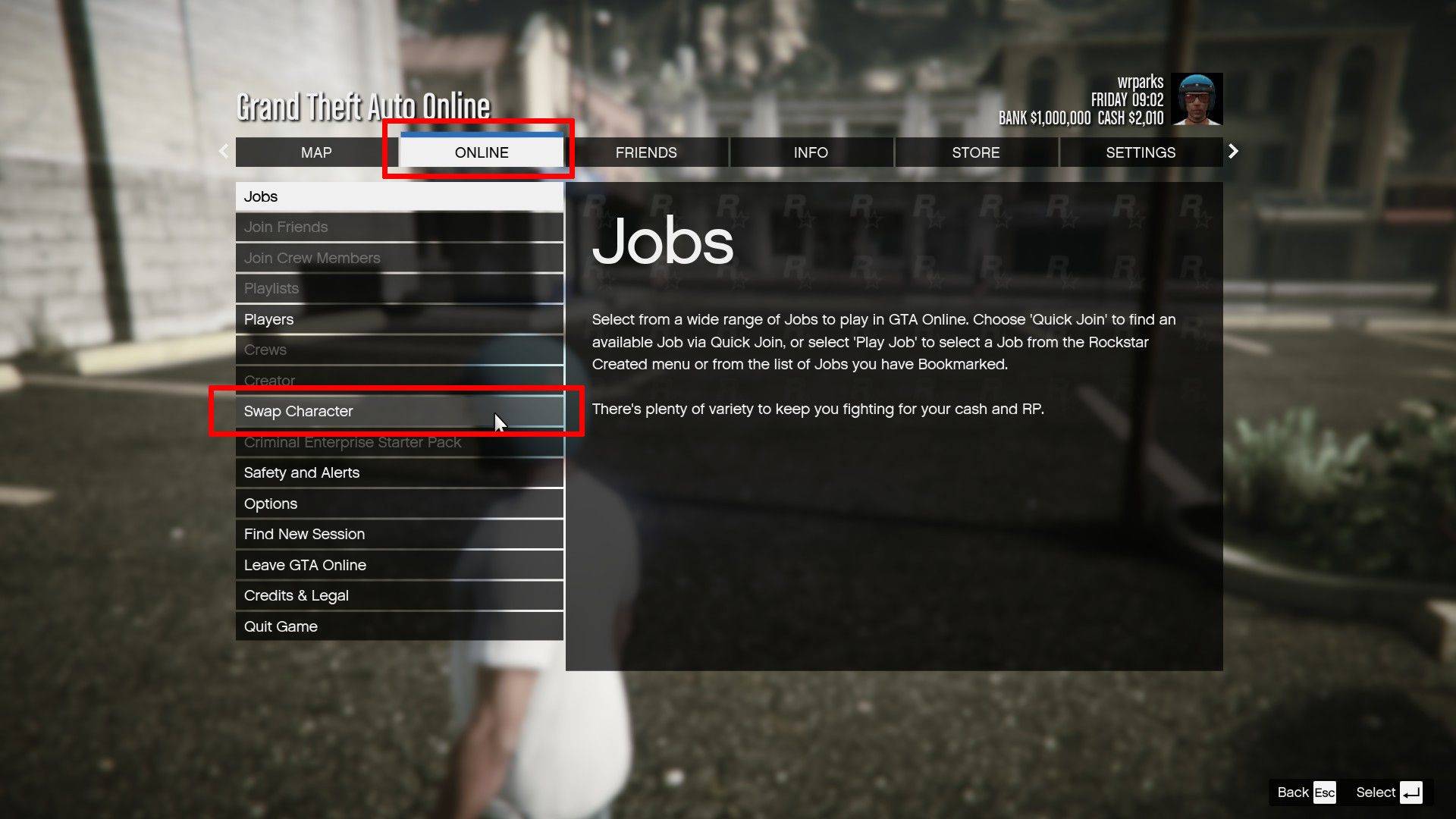
2。スワップ文字メニューへのアクセス:
- 一時停止メニュー(キーボードのESCキーまたはコントローラーのスタートボタン)を開きます。
- 「オンライン」タブに移動します。
- 「文字を交換」を選択します。実際に文字を交換する必要はありません。メニューにアクセスすると、AutoSaveがトリガーされます。
これらの方法を定期的に利用して、GTA 5ストーリーモードとGTAオンラインの両方で進行の喪失を防ぐことを忘れないでください。 AutoSave機能は役立ちますが、手動で保存すると、セキュリティの追加レイヤーが提供されます。
最新記事
Magic Jigsaw Puzzles Debuts Monochrome Edition
April 2024 – New York, NY — Magic Jigsaw Puzzles, the innovative leader in digital and interactive puzzle experiences, has officially launched the Monochrome Edition, a striking new chapter in its acclaimed puzzle lineup. Designed for art lovers, minimalist enthusiasts, and puzzle aficionados seeking a meditative challenge, the Monochrome Edition features a curated collection of hand-crafted puzzles rendered exclusively in shades of black, white, and gray.
Inspired by architectural marvels, abstract art, and the elegance of contrast, the 50 new puzzles in the Monochrome Edition range from subtle grayscale landscapes to intricate optical illusions. Each piece is meticulously designed to highlight form, texture, and negative space—proving that beauty doesn’t require color.
Key Features of the Monochrome Edition:
50 Unique Puzzles: Ranging from 200 to 4,000 pieces, with difficulty levels tailored for all skill levels.
Artistic Minimalism: Collaborations with contemporary artists and photographers who specialize in monochrome aesthetics.
Immersive Experience: Enhanced digital interface with adaptive lighting, allowing players to adjust contrast and brightness for optimal focus.
Mindful Play Mode: A new "Focus Flow" mode that dims the screen edges and reduces distractions—perfect for mindfulness and stress relief.
Digital Framing: After completion, puzzles can be saved in a digital gallery with customizable monochrome frames.
“Color is powerful, but sometimes, the absence of it speaks volumes,” said Elena Marquez, Creative Director at Magic Jigsaw Puzzles. “The Monochrome Edition isn’t just a shift in palette—it’s a journey into subtlety, precision, and perception. We wanted to create an experience that challenges the eye and calms the mind.”
The Monochrome Edition is available now on iOS, Android, and Magic Jigsaw Puzzles’ web platform. A limited physical version, featuring matte-finish puzzle pieces and eco-friendly packaging, will launch in select markets this summer.
For more information, visit: www.magicjigsawpuzzles.com/monochrome
— A puzzle experience, reborn in black and white.
読む



![Taffy Tales [v1.07.3a]](https://imgs.anofc.com/uploads/32/1719554710667e529623764.jpg)