ニュース MinecraftのすべてのMobを殺す方法

MinecraftのすべてのMobを殺す方法

著者 : Aurora アップデート : Mar 05,2025

Minecraft Mob Eliminationのマスター: /killコマンドへの包括的なガイド

MinecraftのMobを排除したいと思うかもしれない多くの理由があります。最も簡単な方法は、コマンド、特に/killコマンドを使用することです。ただし、この一見単純なコマンドでさえ、いくつかのニュアンスがあります。このガイドでは、 /killコマンドを使用して効果的に説明し、さまざまなモブをターゲットにして削除します。

始める前に:チートを有効にします

/killコマンドには、チートが有効になっている世界が必要です。チートがまだアクティブになっていない場合は、次の手順に従ってください。

Java Edition:

  1. あなたの世界を入力してください。
  2. ESCを押します。
  3. 「LANに開く」を選択します。
  4. 「コマンド」を「オン」に切り替えます。

これにより、そのセッションのみでチートが可能になります。チートを永久に有効にするには、世界の作成プロセス中に有効になっているチートを使用して、世界のコピーを作成します。
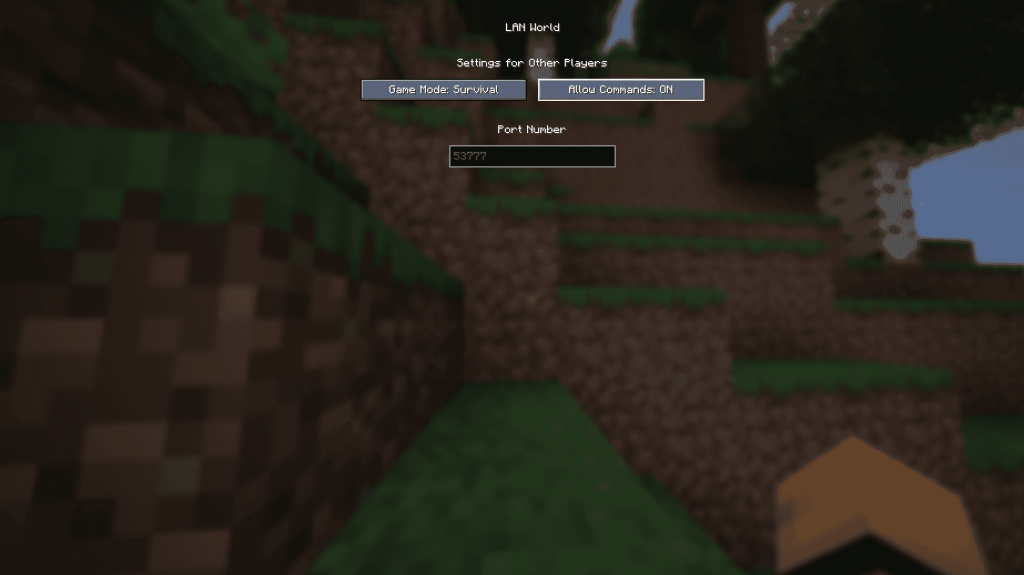
Minecrafr LAN Screen Java Editionにオープン

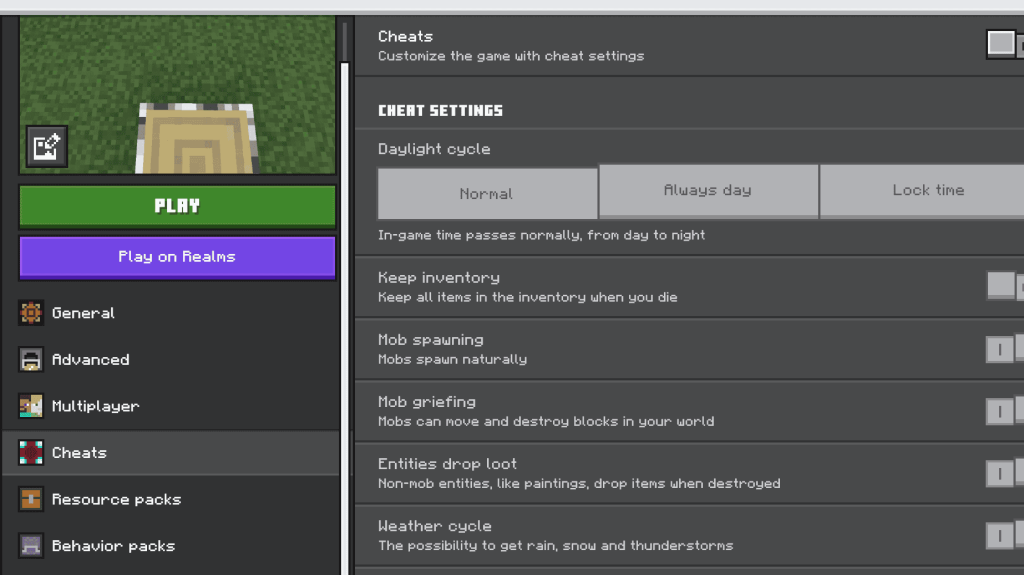
岩盤版:

  1. あなたの世界を見つけてください。
  2. 変更したい世界を選択します。
  3. 鉛筆アイコンをクリックして、世界の設定を編集します。
  4. 右下のメニューで、「チート」を「オン」に切り替えます。

Minecraftは、Mobを殺す方法に関する記事の一環として、スクリーンベッドロック版をチートします。

/killコマンドを使用します

Basic /killコマンドは/killですが、これによりプレイヤーのキャラクターが殺されます。モブをターゲットにするには、セレクターを追加する必要があります。

  • すべてのMOBを殺す(プレーヤーを除く): /kill @e[type=!minecraft:player]@eすべてのエンティティ; type=!minecraft:playerプレーヤーを除外します。)

  • 特定の暴徒の種類を殺す: /kill @e[type=minecraft:chicken]chickenを希望の暴徒タイプ、例えばsheepzombieなどに置き換える)

  • 半径内でMobを殺す:

    • Java Edition: /kill @e[distance=..15] (15ブロック以内のエンティティを殺します。)
    • Bedrock Edition: /kill @e[r=10] (半径10ブロック以内のエンティティを殺します。)
  • 半径内で特定のモブを殺す:

    • Java Edition: /kill @e[distance=..15,type=minecraft:sheep]
    • 岩盤版: /kill @e[r=10,type=minecraft:sheep]

ゲームはコマンドをオートコンプリートし、比較的使いやすくなります。

重要なセレクター:

  • @p :最寄りのプレイヤー
  • @r :ランダムプレーヤー
  • @a :すべてのプレイヤー
  • @e :すべてのエンティティ
  • @s :あなた自身

これらのコマンドを使用すると、Minecraftの世界でMOB集団を効率的に管理できます。セレクターを調整して、希望するモブと半径をターゲットにしてください。

最新記事

もっと
Magic Jigsaw Puzzles Debuts Monochrome Edition April 2024 – New York, NY — Magic Jigsaw Puzzles, the innovative leader in digital and interactive puzzle experiences, has officially launched the Monochrome Edition, a striking new chapter in its acclaimed puzzle lineup. Designed for art lovers, minimalist enthusiasts, and puzzle aficionados seeking a meditative challenge, the Monochrome Edition features a curated collection of hand-crafted puzzles rendered exclusively in shades of black, white, and gray. Inspired by architectural marvels, abstract art, and the elegance of contrast, the 50 new puzzles in the Monochrome Edition range from subtle grayscale landscapes to intricate optical illusions. Each piece is meticulously designed to highlight form, texture, and negative space—proving that beauty doesn’t require color. Key Features of the Monochrome Edition: 50 Unique Puzzles: Ranging from 200 to 4,000 pieces, with difficulty levels tailored for all skill levels. Artistic Minimalism: Collaborations with contemporary artists and photographers who specialize in monochrome aesthetics. Immersive Experience: Enhanced digital interface with adaptive lighting, allowing players to adjust contrast and brightness for optimal focus. Mindful Play Mode: A new "Focus Flow" mode that dims the screen edges and reduces distractions—perfect for mindfulness and stress relief. Digital Framing: After completion, puzzles can be saved in a digital gallery with customizable monochrome frames. “Color is powerful, but sometimes, the absence of it speaks volumes,” said Elena Marquez, Creative Director at Magic Jigsaw Puzzles. “The Monochrome Edition isn’t just a shift in palette—it’s a journey into subtlety, precision, and perception. We wanted to create an experience that challenges the eye and calms the mind.” The Monochrome Edition is available now on iOS, Android, and Magic Jigsaw Puzzles’ web platform. A limited physical version, featuring matte-finish puzzle pieces and eco-friendly packaging, will launch in select markets this summer. For more information, visit: www.magicjigsawpuzzles.com/monochrome — A puzzle experience, reborn in black and white. 読む