Дом Новости Terracotta в Minecraft: полный гид

Terracotta в Minecraft: полный гид

Автор : Emily Обновлять : Apr 22,2025

В мире Minecraft Terracotta выделяется как универсальный и визуально привлекательный строительный материал, который отмечается своим широким спектром цветов и практического использования. Эта статья углубляется в процесс создания терракотты, ее уникальных свойств и ее применения в строительных проектах в различных версиях игры.
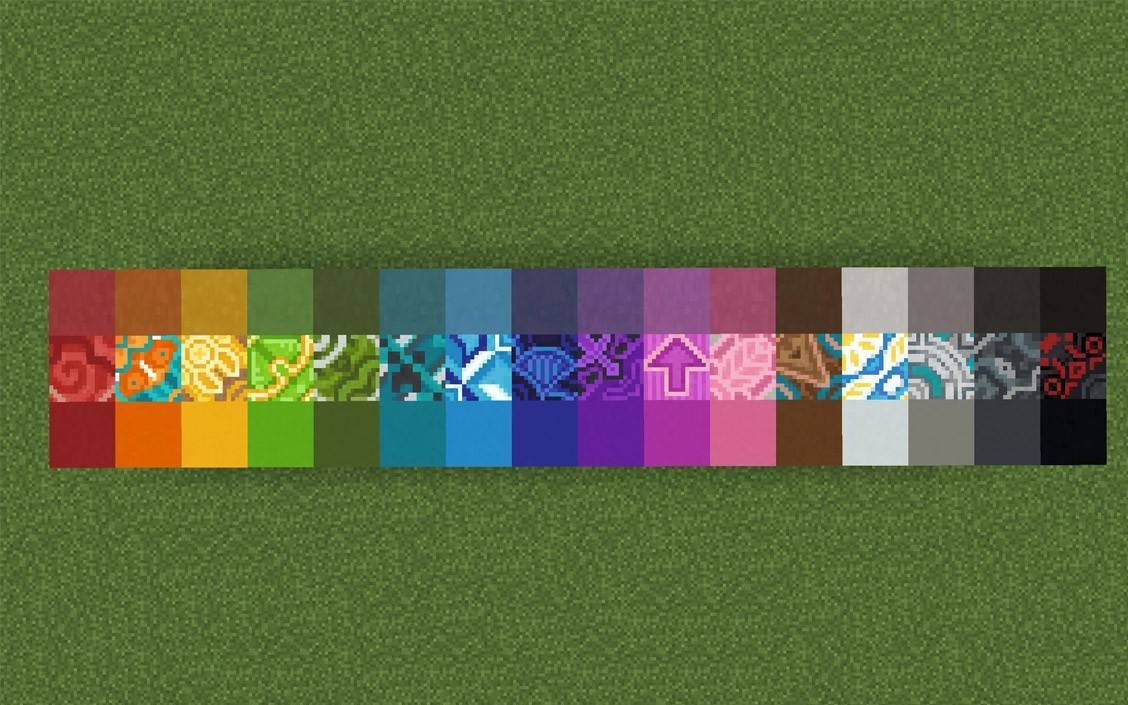
Терракота в Minecraft Изображение: Planetminecraft.com

Оглавление

  • Как получить терракоту в Minecraft
  • Идеальное место для сбора терракоты
  • Типы терракотты
  • Как использовать терракоту в ремесле и строительстве
  • Доступность терракотты в разных версиях Minecraft

Как получить терракоту в Minecraft

Чтобы начать создание терракотты, вам сначала нужно собирать глину, которая обычно встречается в водоемах, реках и болотах. Разбейте глиняные блоки, чтобы собрать глиняные шарики, которые вы затем пахли в печи. Вам понадобится топливо, как уголь или древесина для питания печи. После выплавки глина превращается в терракоту.
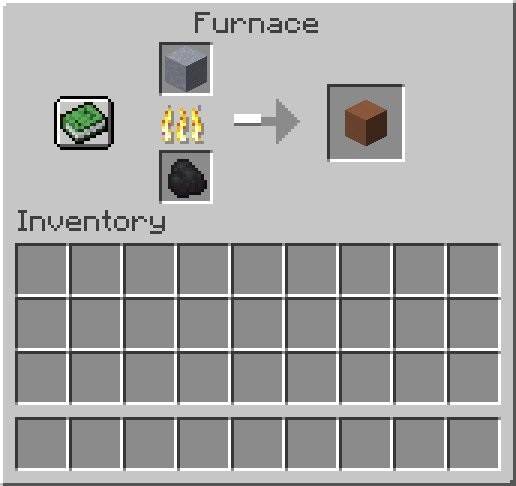
Как сделать терракоту в Minecraft Изображение: Ensigame.com

Terracotta также можно найти в определенных генерируемых структурах, особенно в биоме MESA, где в естественных окрашенных версиях в изобилии. В издании Minecraft Bedrock вы также можете приобрести Terracotta, торговля с жителями деревни.
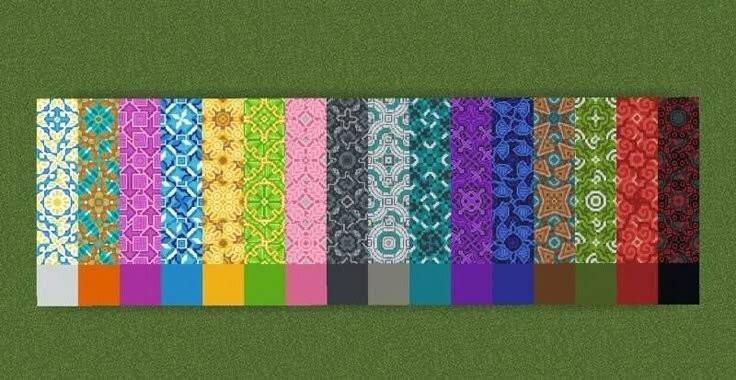
Терракота в Minecraft Изображение: pinterest.com

Идеальное место для сбора терракоты

Биом из Баллендс является первоклассным местом для энтузиастов терракотта. Этот редкий и красочный биом - это природная сокровища терракотта, в которой есть слои апельсинового, зеленого, фиолетового, белого и розового. Здесь вы можете собирать терракоту в больших количествах, не обрабатывая его заранее.
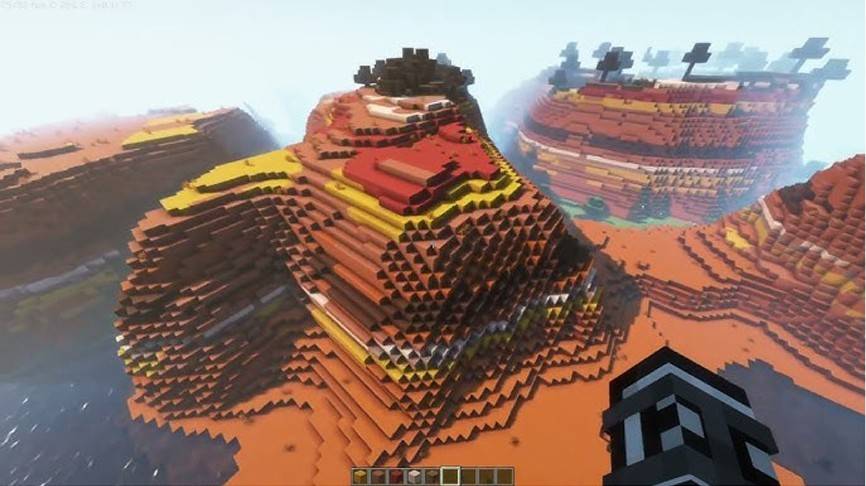
Терракота в Minecraft Изображение: YouTube.com

В дополнение к TerraCotta, BADLANDS BIOME предлагает:

  • Песчаник и песок на поверхности
  • Золото ближе к поверхности, чем в других биомах
  • Мертвые кусты для сбора палочек

Уникальный ландшафт Бесвязи также делает его идеальным местом для строительства красочных баз и сбора основных материалов.

Типы терракотты

Терракота обычно имеет коричневато-оранжевый оттенок, но его можно преобразовать в шестнадцать различных цветов, используя красители в ремесленном столе. Например, сочетание фиолетового красителя с терракоттой дает фиолетовую терракоту.
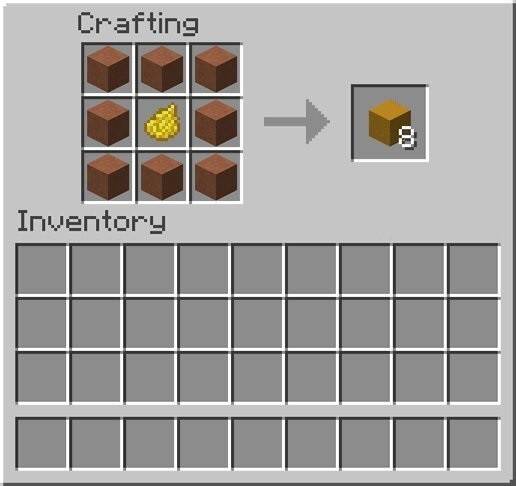
Как сделать терракоту в Minecraft Изображение: Ensigame.com

Глазированная терракота, созданная выплатой окрашенной терракоттой в печи, оснащены уникальными узорами, которые можно организовать для создания декоративных дизайнов. Эти блоки идеально подходят как для эстетического, так и для функционального здания, что позволяет вам выделить области или отмечать конкретные места с их различными закономерниками.
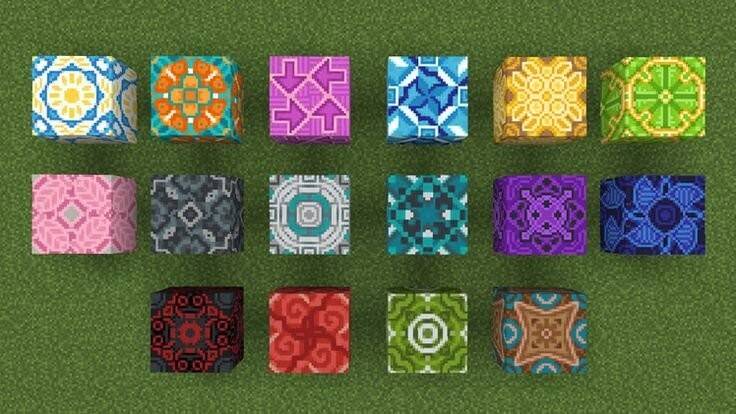
Терракота в Minecraft Изображение: pinterest.com

Как использовать терракоту в ремесле и строительстве

Сила и разнообразие Terracotta делают его отличным выбором как для внутреннего, так и для внешнего украшения. Он используется для облицовки стены, пола и крыши, а в выпуске «Перет» он может быть частью сложных мозаичных панелей. Осторожно расположив разные цвета, вы можете достичь потрясающих дизайнов.
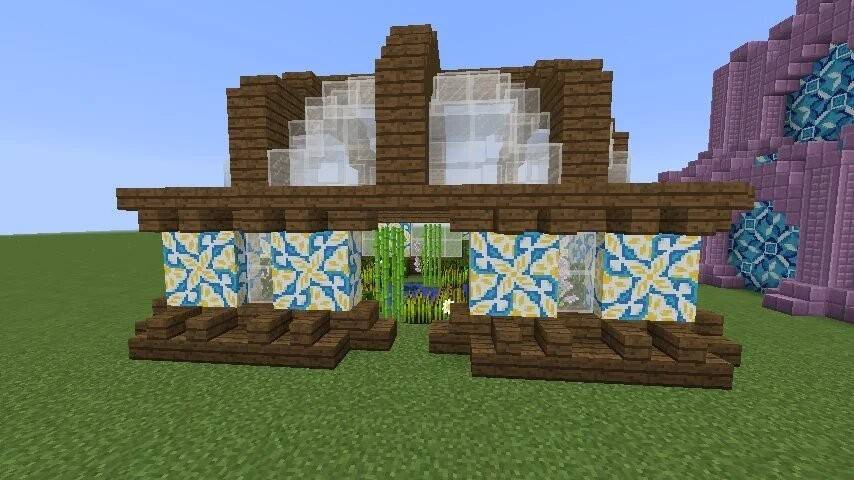
Терракота в Minecraft Изображение: reddit.com

В Minecraft 1.20 TerraCotta служит материалом для шаблона «Поминками» брони, что позволяет вам настраивать броню с уникальными узорами.

Доступность терракотты в разных версиях Minecraft

TerraCotta доступна как в Java, так и в выпусках Bedrock, с аналогичной механикой для ее получения, хотя текстуры могут немного различаться. В некоторых версиях вы можете обменять с жителями Мейсона мастерского уровня на различные виды терракотты, предлагая альтернативный метод, если вы не рядом с биомом MESA или предпочитаете не парить глину.
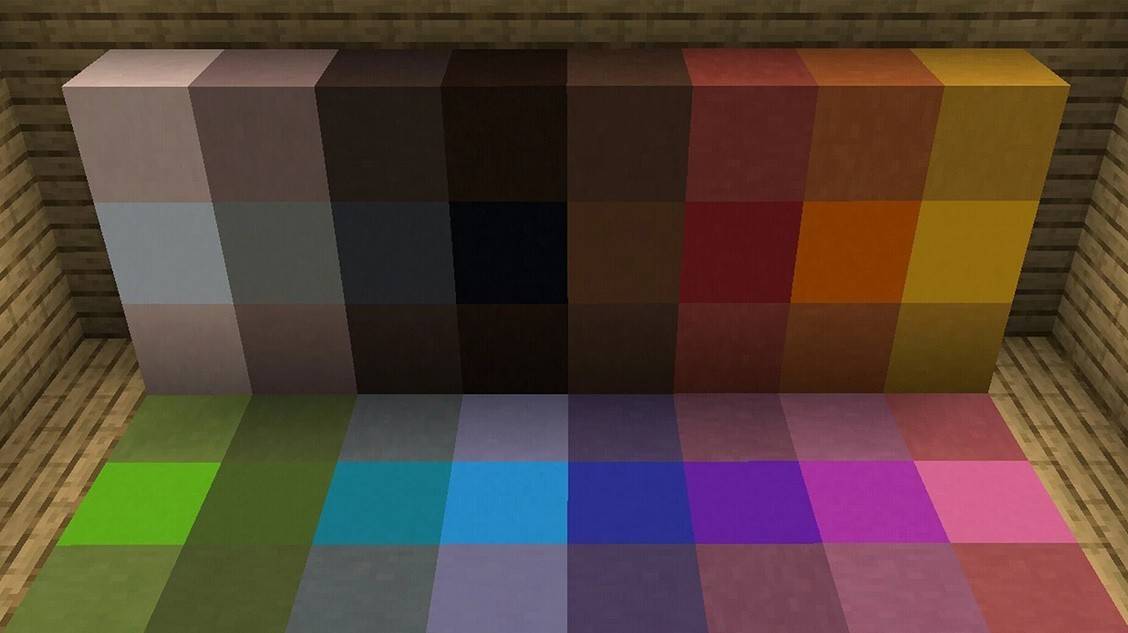
Терракота в Minecraft Изображение: Planetminecraft.com

Terracotta - это надежный и эстетически приятный блок, который легко приобрести и покрасить в спектре цветов. Независимо от того, используется ли в его твердой форме или в качестве застекленной терракоты со сложными узорами, это отличный выбор для улучшения ваших конструкций Minecraft. Экспериментируйте с Terracotta, чтобы воплотить в жизнь ваши творческие видения!

Последние статьи

Более
It sounds like you're mixing a few different topics — Pokémon games, MSI desktops, and The Legend of Zelda: Breath of the Wild (often referred to as "Zelda Sword" in casual talk). Let me help clarify or connect the dots based on what you might be asking: 🎮 Switch Pokémon Games If you're looking to play Pokémon on the Nintendo Switch, here are some key titles: Pokémon Sword and Shield (2019) – Released on Switch, features the Galar region and Dynamax battles. Pokémon Brilliant Diamond and Shining Pearl (2021) – Remakes of the classic Pokémon Diamond and Pearl, set in the Sinnoh region. Pokémon Legends: Arceus (2022) – A groundbreaking open-world Pokémon game set in the Crown Tundra and Hisui region. Note: Pokémon Sword and Shield and Legends: Arceus are exclusive to the Switch. 💻 MSI Desktops MSI is a popular brand for gaming PCs and desktops. If you're thinking about pairing an MSI desktop with your Switch: You can use an MSI gaming desktop to play Pokémon games via emulators (like Pokémon Emerald on Dolphin) or even stream Switch games via NVIDIA GameStream or Steam Remote Play. Some MSI desktops (e.g., the MAG, GF, or parts of the Vector series) are powerful enough to handle modern Pokémon games or even emulated older ones. ⚠️ Important: Emulating Switch games (like Pokémon Sword) on a desktop is technically possible but may involve legal and ethical concerns due to copyright and piracy. ⚔️ Zelda Sword (likely referring to The Legend of Zelda: Breath of the Wild or The Legend of Zelda: Tears of the Kingdom) Breath of the Wild (2017) – Released on Switch, praised as one of the greatest video games ever. Tears of the Kingdom (2023) – The direct sequel, also on Switch. These are not Pokémon games, but they do run on the same Nintendo Switch console. Many fans enjoy both franchises, especially since both feature open-world exploration and adventure. 🔍 Summary: You can play Pokémon Sword and Shield, Brilliant Diamond, and Legends: Arceus on the Switch. MSI desktops can be used for gaming, including emulating older Pokémon games or playing other titles like Zelda: Breath of the Wild (if streamed). Zelda: Sword likely refers to Breath of the Wild or Tears of the Kingdom, not a Pokémon game. 💬 If you have a specific question like: "Can I play Pokémon Sword on an MSI desktop?" "What's the best MSI desktop to play Switch games on?" "Which Switch Pokémon game is best for beginners?" Let me know — I’ll help you pick the right setup! 😊 Чтение
MLB The Show 26: Go! Launches – A New Era of Baseball Strategy Game Begins Get ready to step up to the plate like never before—MLB The Show 26: Go! has officially launched, bringing a fresh wave of strategy, realism, and innovation to baseball fans worldwide. Developed by Sony Interactive Entertainment and published by MLB, this year’s installment elevates the franchise to new heights with groundbreaking gameplay mechanics, immersive visuals, and a dynamic new "Go!" mode designed for fast-paced, tactical decision-making. Key Features of MLB The Show 26: Go! ⚾ Go! Mode – The Ultimate Tactical Challenge Introducing Go!, a new gameplay mode built for players who crave strategy and speed. In Go! mode, every pitch, steal, and baserunning decision carries higher stakes. Managers must think ahead—adjusting defensive alignments, calling smart pitch sequences, and exploiting opponent weaknesses in real time. It’s baseball at its most cerebral. ⚾ Enhanced AI and Player Intelligence Thanks to advanced machine learning, players now react more naturally to in-game situations. Batters adjust their stance based on pitch location, pitchers mix in new pitch types mid-inning, and base runners make smarter read decisions. The game feels alive, like a real MLB contest. ⚾ Next-Gen Graphics and Physics Powered by the Unreal Engine 5, MLB The Show 26: Go! delivers jaw-dropping visuals—from lifelike facial animations to real-time stadium lighting and weather effects. The new physics engine makes every collision, catch, and home run feel authentic. ⚾ Expanded Career Mode & Franchise Evolution Players can now shape their journey from rookie to legend, with deeper team-building mechanics and evolving player relationships. Choose your path: become a superstar slugger, a master tactician on the mound, or a leadership-driven manager. ⚾ Cross-Platform Play (Beta) For the first time in the series, MLB The Show 26: Go! offers limited cross-platform play between PlayStation 5 and select mobile devices (via cloud streaming), allowing fans to jump into a game on the go—perfect for busy seasons. ⚾ New Soundtrack and Broadcast Experience A curated soundtrack featuring indie rock, hip-hop, and classic baseball anthems sets the tone. Plus, the broadcast team delivers real-time commentary that reacts dynamically to in-game events, from walk-offs to record-breaking home runs. Availability MLB The Show 26: Go! is now available on PlayStation 5 and via cloud streaming on select mobile platforms. A special "Go! Collector’s Edition" includes exclusive in-game content, digital artwork, and a 30-day premium subscription to MLB.TV. Final Pitch “Baseball isn’t just a game—it’s a mindset. And in MLB The Show 26: Go!, every decision counts.” – Sony Sports Creative Director Whether you’re a lifelong fan or new to the diamond, MLB The Show 26: Go! isn’t just a game—it’s a full-contact experience. Step up. Play smart. Go! 👉 Download now on PlayStation 5 and via cloud on supported devices. The Show goes on—don’t miss a single pitch. Чтение